The most common thing we hear from people considering home automation in Nigeria is not about price. It is: "But what happens when NEPA takes light? And my network is always bad." It is a fair worry. A smart home that stops working every time the power or the internet drops would be worse than the ordinary switches it replaced.
The good news is that a properly designed smart home is built around exactly these problems. Here is the honest picture.
Two Different Problems: Power and Internet
People mix these up, but they are separate, and each has a different fix. Your smart home depends on electricity for the mains-powered parts, and on internet only for some features. Most daily use needs neither the internet nor much more than the local network in your home.
When the Power Goes Off
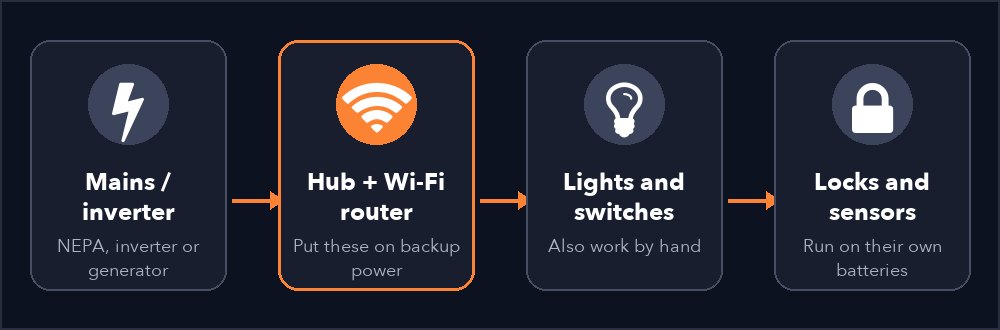
- Your wall switches still work. A good smart switch is still a normal switch you can press by hand, so nobody in the house is ever stuck. If the power is off, the lights are off anyway, and when the inverter or generator comes on the lights on that circuit behave as usual.
- Battery devices keep working. Smart door locks, motion sensors, door sensors and remotes run on their own batteries. They do not care about NEPA.
- The hub and router are the weak point. The small hub (gateway) that connects your devices, and the Wi-Fi router, run on mains. If they go off, apps and automations pause until power returns. The fix is simple: put the hub and router on your inverter or a small UPS. They draw very little power.
- Power coming back is where bad systems fail. You do not want every light and appliance snapping on at 3am when NEPA returns. A well-set smart switch can be set to come back off, on or in its last state. We usually set bedrooms and living areas to stay off, and anything you want back, such as security lights, to come on.
Generator tip: set the lights in rooms nobody is using to stay off when power returns. It stops you burning fuel to light empty rooms.
When the Internet Is Bad or Down
Many smart devices talk to each other through a local hub using Zigbee, a low-power wireless link inside your home, rather than through the internet. This is why the choice of devices matters so much. Here is how it breaks down:
What usually keeps working without internet
- Pressing wall switches and physical buttons
- Control from your phone while you are at home on the home Wi-Fi (on a well-built local setup)
- Many automations, such as a motion sensor turning on a corridor light, when the hub runs them locally. Ask your installer to confirm this for the exact devices you are buying.
- Door locks, which work on their own batteries
What needs internet
- Controlling your home from outside, for example from the office or abroad
- Voice assistants such as Alexa and Google Assistant
- Phone notifications and camera viewing away from home
- Software updates and adding new devices through the app
So when the data goes down, you lose the "extras" and keep the essentials. If remote access matters a lot to you, a second connection, such as a 4G/5G router as backup, makes it far more reliable.
How a Smart Home Is Designed to Cope
- Hub and router on the inverter. The single most useful decision you can make.
- Local-first devices. Where possible, choose devices that work through a local hub instead of depending entirely on the cloud.
- Keep every manual switch. Switches that always work by hand are your safety net.
- Choose the power-return behaviour on purpose. Set it room by room instead of leaving it on the default.
- Surge protection. Voltage spikes when power returns are what damage electronics in Nigeria. Protect the hub, router and key circuits.
- Backup connection. If your work or security depends on remote access, add a second internet source.
Questions to Ask Any Installer
- Will my lights still work by hand if the hub or internet is down?
- Which of my automations run locally, and which depend on the cloud?
- What do my switches do when power returns?
- Is the hub on my inverter, and how many hours will it stay up?
- What happens if a device in the chain is replaced or fails?
Quick Answers
Does a smart home work during a power cut?
Wall switches and battery devices keep working. Mains-powered devices go off unless they are on your inverter. Put the hub and router on backup power and the system stays reachable.
Do I need internet for a smart home?
Not for everyday use at home with the right devices. Remote control from outside and voice assistants do need it.
What should go on the inverter?
The hub and the Wi-Fi router first. They use very little power and keep everything else reachable.
Want to go further? Our guides on solar and smart homes and smart lighting in Nigeria show how all this fits together.
Want a Smart Home That Copes With Nigerian Conditions?
We design every system around power cuts and weak internet. Book a free site assessment and we will show you exactly how yours would behave.
Book a Free Site Assessment